Get Started with Opal
Use the Lacework CLI
Opal is bundled within Lacework’s IaC component. To use Opal, you must first install the Lacework CLI and the IaC component. For more information, go to IaC using the Lacework CLI.
Tutorial: Create and Test a Custom Policy
This tutorial describes how to create a policy and the required directory, as well as how to create tests and test policies. If you are familiar with Opal and configuring it, skip to Usage.
Create a Custom Policy Directory
To create and test a custom Opal policy, you must first create a directory of your choice named policies.
Create a Custom Policy
To create a custom policy, start the Opal interactive wizard by running the following command in the Lacework CLI:
lacework iac policy create
This command generates the required directory structure for your policy metadata.yaml and skeleton policy.rego file.
Using the wizard, answer the prompts with the following input:
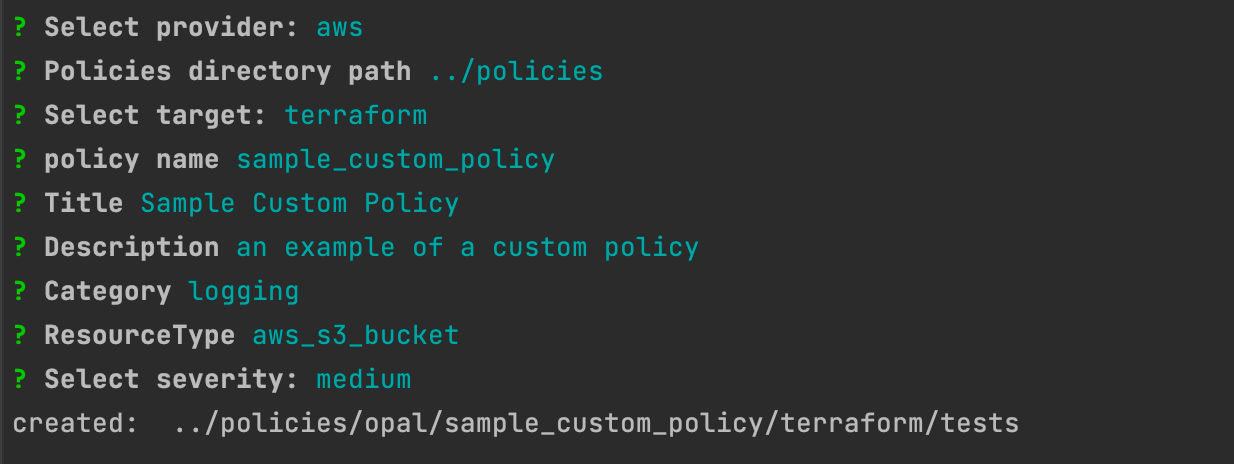
The directory path must point to the existing policies directory that you created previously.
When creating your policy name, it must have the following convention lower_case_policy_name.
You should now find a metadata.yaml file that contains the input you provided with the wizard in the <policies directory path>/opal/sample_custom_policy/metadata.yaml directory.

Go to <path to your policies dir>/sample_custom_policy/terraform and edit the policy.rego file to add the following:
allow {
  input.logging[_].target_bucket = "example"
}
Your policy.rego file should now look like this:
package policies.sample_custom_policy

input_type := "tf"

resource_type := "aws_s3_bucket"

default allow = false

allow {
  input.logging[_].target_bucket = "example"
}
Add Test Input
To add test input, go to <path to your policies dir>/sample_custom_policy/terraform/tests and create a directory for passing tests:
mkdir pass
cd pass
vi main.tf
Copy the following into your main.tf file:
resource "aws_s3_bucket" "test" {
  bucket = "test-bucket"
  logging {
    target_bucket = "example"
  }
}
You can also add a failing test input: (it is not mandatory to have both pass and fail)
cd ../
mkdir fail
cd fail
vi main.tf
You do not need to have both a pass and a fail.
Copy the following into your main.tf file:
resource "aws_s3_bucket" "test" {
  bucket = "test-bucket"
  logging {
    target_bucket = "bad-example"
  }
}
Test the Custom Policy
To test the custom policy, run:
lacework iac policy test -d <path to sample_custom_policy>
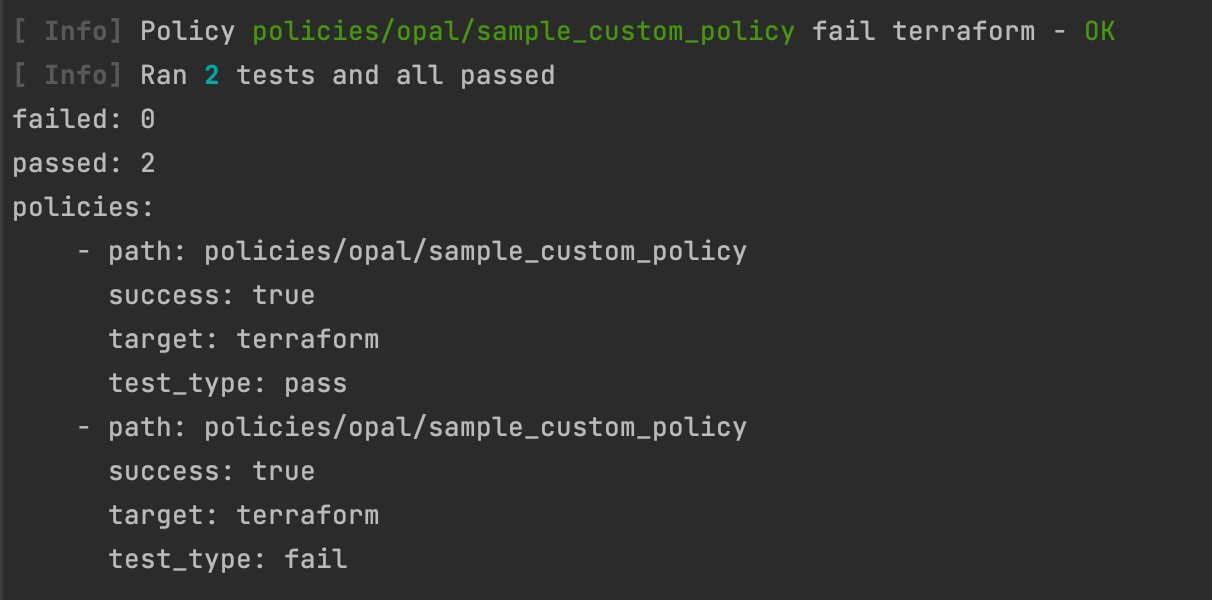
In the following example, 2 tests (pass and fail) ran and passed:
Debug tests using the Rego print function
When you execute lacework iac policy test, print_statements is listed in the test result data. print_statements lists the message(s) generated by Rego when the print function is called.
Viewing print_statements in the test output requires Opal version v0.3.5 or later. You can check or update the Opal version using the lacework iac download command.
print example
Example function call:
has_escalation_field(securityContext) {
    _ = securityContext["allowPrivilegeEscalation"]
    print(sprintf("securityContext has allowPrivilegeEscalation set: %s",[securityContext]))
}
When you test a policy with a test case that reaches this print evaluation; the output of lacework policy test includes:
print_statements: [
    {
      "Message": "securityContext has allowPrivilegeEscalation set: {\"allowPrivilegeEscalation\": true, \"fsGroup\": 2000, \"runAsUser\": 1000}",
      "Line": 80,
      "PolicyFile": "/Users/alice/code/kubernetes/policies/opal/forbid_privilege_escalation/kubernetes/policy.rego"
    }
]
Placing the print statement at the end of the function causes it to only execute if all preceding statements evaluate as true.
You may wish to print at the start of a function to check if the function is being called.
In Rego, when a variable or function return value is undefined, any function using that value will also return undefined.
For the print function, that means that if you build up a print message using string functions like sprintf or concat, the entire Message in your test output will be undefined if any expression or variable is undefined.
It is recommended not to commit custom policies with print statements to version control as they generate additional intermediary data.
Upload a Custom Opal Policy
You can also upload a custom Opal policy that you created outside the Lacework CLI.
Your directory structure should look similar to this:
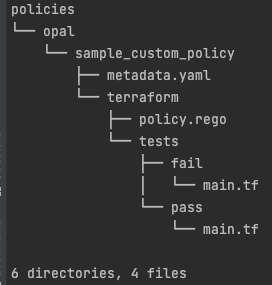
If it does not, refer to the tutorial for creating a custom policy directory
When you upload custom policies, a zip file of all the policies in your policies directory is created and uploaded. This means that when you add or edit a policy, the entire set of policies is uploaded. This is now your latest set of policies that will overwrite the previous set.
To upload a set of policies, run the following command:
lacework iac policy upload -d <path to policies parent dir>
You should now see that a zip file has been created with your new policy. You should also receive a 200 response indicating that the upload was successful.
<path to policies parent dir> refers to the parent directory of your policies directory. Do not include policies in the path.
Example: If your policies directory resides in /Users/xyz/workspace/policies then the path you should provide is /Users/xyz/workspace.
Usage
Run Opal with Custom Policies
To run Opal with custom policies on a target directory, run:
lacework iac tf-scan opal --disable-custom-policies=false -d <path to target directory>
If you do not specify a directory, Opal runs in the current directory. Opal outputs a pass or fail result for each policy as well as additional assessment results. For more information, go to Opal Output.
Test a Custom Opal Policy
To test custom policies, run the following command:
lacework iac policy test -d <path to sample_custom_policy>
This command runs an Opal scan on files in the /terraform/test directory of the policy. For more information about testing custom policies go to Test Policies.
Flags
| Flag | Description |
|---|---|
-d, --directory [string] | Load policies from the specified directory. |
-h, --help | Help for test. |
Other Policy Commands
Lacework IaC Security offers other policy commands that do not run Opal. To use these commands, enter the following into the Lacework CLI:
lacework iac policy [command]
Available Policy Commands
| Command | Description |
|---|---|
create | Create a custom policy. Generates a skeleton policy and metadata file. |
download | Download Lacework and custom opal policies. |
prepare | Generate the prepared policy for evaluation by the underlying engine. Aliases: prop |
upload | Upload custom policies. |
vet | Vet a custom policy for potential errors. |