Azure

Cloud Security and Compliance provides supports the following Use Cases and Lacework Features:

Use CasesLacework Feature(s)Data Source
Cloud Security Posture Management (CSPM)
Cloud Infrastructure Entitilement Management (CIEM)
Compliance Dashboard and Reports
Cloud Infrastructure Entitilement Management Dashboard
Attack Path Analysis and Exposure Polygraph
Azure Cloud Configuration
User Entity Behaviour Analytics (UEBA)Cloud Anomaly Detection
Cloud Drift Detection
Cloud Audit Polygraph
Azure Cloud Audit Logs
Vulnerability ManagementVulnerability Management DashboardACR

See below for information on planning Lacework integrations and the specific use cases for each integration:

Use CasesLacework Feature(s)Data Source
Cloud Security Posture Management (CSPM)
Cloud Infrastructure Entitilement Management (CIEM)
Compliance Dashboard and Reports
Cloud Infrastructure Entitilement Management Dashboard
Attack Path Analysis and Exposure Polygraph
Azure Cloud Configuration
User Entity Behaviour Analytics (UEBA)Cloud Anomaly Detection
Cloud Drift Detection
Cloud Audit Polygraph
Azure Cloud Audit Logs
Prerequisites 📎

Overview

This topic describes how to integrate with Azure by running Lacework Terraform modules from any host supported by Terraform.

If you are new to the Lacework Terraform provider, or Lacework Terraform modules, read Terraform for Lacework Overview to learn the basics on how to configure the provider and more.

The approach outlined in this topic is targeted towards companies that store Terraform code in source control and plan to continue to manage the state of the integration between Lacework and Azure using Terraform.

Lacework also supports running Terraform from Azure Cloud Shell, which comes with Terraform pre-installed. For instructions on running Terraform from Azure Cloud Shell, see Azure Integration - Terraform from Azure Cloud Shell.

Resources

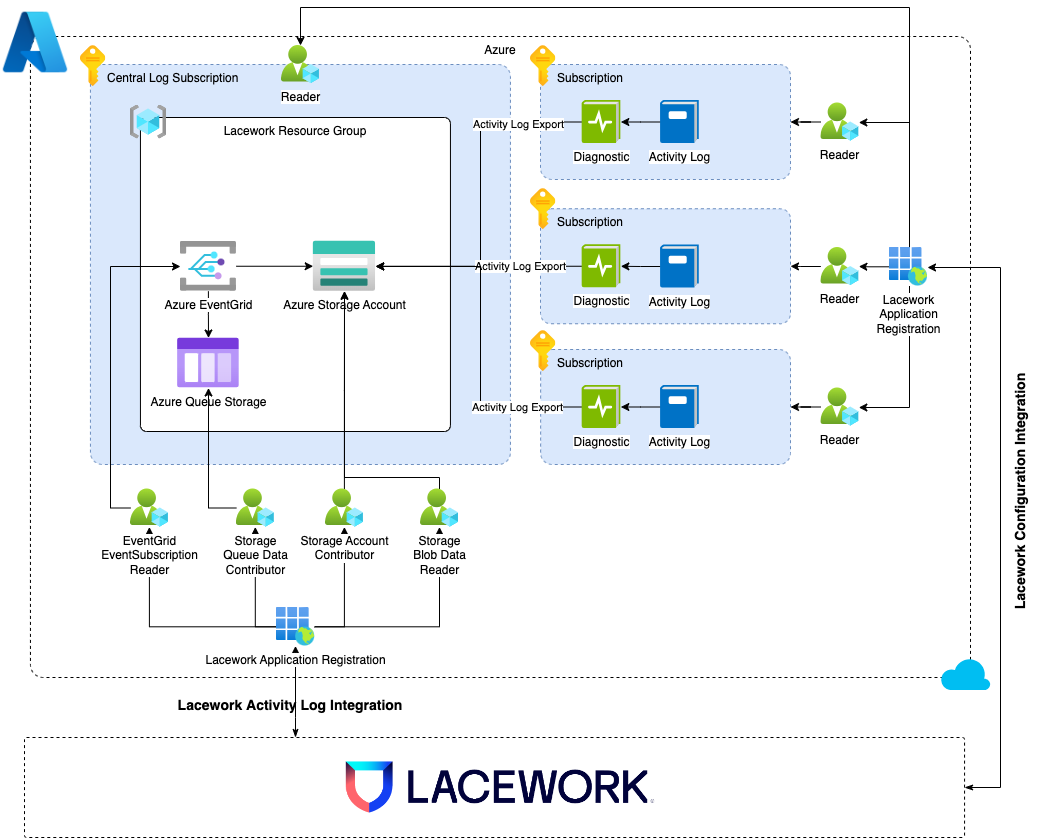
To monitor Microsoft Azure Activity Logs and compliance, Lacework requires the following resources:

  • Azure AD Application - An AD application with permissions to read directory information (using the Directory Reader Role).
  • Azure Resource Group - A resource group is created to store all resources provisioned during the integration.
  • Azure Storage Account - A storage account is used to store Activity Logs.
  • Azure Storage Queue - A queue to hold activity log data.
  • Azure Event Grid Subscription - An Event Grid used to send notifications about events in Activity Logs.

Requirements

The following is a list of requirements to run Lacework Terraform modules for Azure locally:

  • Azure Global Administrator - An Azure portal account that has a Global Administrator role for your tenant's directory.
  • Azure Owner Role - An Azure portal account with the Owner role in all subscriptions that you want to monitor.
  • Azure CLI - The Terraform provider for Azure leverages configuration from the Azure CLI to configure resources in Azure.
  • Lacework Administrator - A Lacework account with administrator privileges.
  • Lacework CLI - The Terraform Provider for Lacework leverages the configuration from the Lacework CLI.
  • Terraform - ~> 0.14, ~> 0.15, ~> 1.0, ~> 1.1.

Module Dependencies

Lacework Terraform modules for Azure have the following dependencies that will be installed when running terraform init:

For detailed information on these dependencies, visit Lacework on the Terraform Registry.

Architecture 📎
Lacework Cotainer Registry Architecture